


MANUFACTURER
QUANTUM CORPORATION
DLT 7000 (INTERNAL VER. 1)
Device Type | Internal Tape Drive |
Interface | SCSI-2 Fast/Wide |
Format | DLT |
Sustained Transfer Rate | 5.2 MBPS |
Size | 5.25 in. full height |
View | Top |

USER CONFIGURABLE SETTINGS | |||
Setting | Label | Position | |
| » | Factory configured - do not alter. (Parity enable/disable) | JP1/Pins 1 & 2 | Unidentified |
| » | Factory configured - do not alter. | JP1/Pins 3 - 26 | Unidentified |
| » | Factory configured - do not alter. | JP2/Pins 1 - 2 | Unidentified |
| » | Factory configured - do not alter. (Termination power enable/disable) | JP2/Pins 3 - 4 | Unidentified |
| » | Factory configured - do not alter. | JP2/Pins 5 - 26 | Unidentified |
| » | Factory configured - do not alter. (Loader connector) | JP4 | Unidentified |
Note: Pin-out of JP4 is unidentified. | |||
DRIVE SELECT ID | |||||
Drive ID | JP3/Pins 3 & 4 | JP3/Pins 5 & 6 | JP3/Pins 7 & 8 | JP3/Pins 9 & 10 | |
0 | Open | Open | Open | Open | |
1 | Open | Open | Open | Closed | |
2 | Open | Open | Closed | Open | |
3 | Open | Open | Closed | Closed | |
4 | Open | Closed | Open | Open | |
| » | 5 | Open | Closed | Open | Closed |
6 | Open | Closed | Closed | Open | |
7 | Open | Closed | Closed | Closed | |
8 | Closed | Open | Open | Open | |
9 | Closed | Open | Open | Closed | |
10 | Closed | Open | Closed | Open | |
11 | Closed | Open | Closed | Closed | |
12 | Closed | Closed | Open | Open | |
13 | Closed | Closed | Open | Closed | |
14 | Closed | Closed | Closed | Open | |
15 | Closed | Closed | Closed | Closed | |
Note: Pins 1 & 2 of JP3 are to be closed when selecting SCSI IDs. | |||||
MANUFACTURERS RECOMMENDED MEDIA | ||
Tape | Capacity Without Compression | Capacity With Compression |
DLT tape IV 1778ft. | 35GB | 70GB |
DLT tape IIIxt 1778 | 15GB | 30GB |
DLT tape III | 10GB | 20GB |
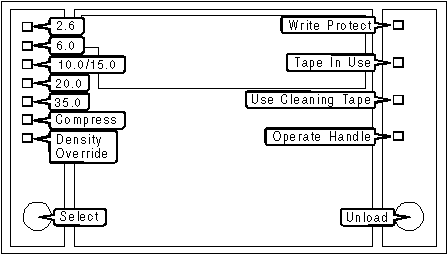
DIAGNOSTIC LED(S) | |||
LED | Color | Status | Condition |
Write Protect | Orange | On | Cartridge is write-protected. |
Write Protect | Orange | Off | Cartridge is write-enabled. |
Tape In Use | Yellow | Blinking | Cartridge is loaded and tape is moving. |
Tape In Use | Yellow | Off | Cartridge is loaded and ready for use. |
Use Cleaning Tape | Yellow | On | Drive head requires cleaning, or tape is bad. |
Use Cleaning Tape | Yellow | Remains on after cleaning tape unloaded | Cleaning tap attempted to clean drive head, tape expired, cleaning not performed. |
Use Cleaning Tape | Yellow | Turns on when data cartridge loaded after cleaning | Problem data cartridge. Attempt different cartridge. |
Use Cleaning Tape | Yellow | Off | Cleaning complete, or cleaning unnecessary. |
Operate Handle | Green | On | Okay to operate cartridge insert/release handle |
Operate Handle | Green | Off | Do not operate cartridge insert/release handle |
2.6 | Yellow | On | Indicates tape is recorded in 2.6GB format. |
2.6 | Yellow | Blinking | Indicates tape is recorded in another density selected for a write from BOT. |
6.0 | Yellow | On | Indicates tape is recorded in 6.0GB format. |
6.0 | Yellow | Blinking | Indicates tape is recorded in another density selected for a write from BOT. |
10.0/15.0 | Yellow | On | Indicates tape is recorded in 10.0GB format if DLT™ tape III is used. Indicates tape is recorded in 15.0GB format if DLT™ tape IIIxt is used. |
10.0/15.0 | Yellow | Blinking | Indicates tape is recorded in another density selected for a write from BOT. |
20.0 | Yellow | On | Indicates tape is recorded in 20.0GB format. |
20.0 | Yellow | Blinking | Indicates tape is recorded in another density selected for a write from BOT. |
DIAGNOSTIC LED(S) | |||
LED | Color | Status | Condition |
35.0 | Yellow | On | Indicates tape is recorded in 35.0GB format. |
35.0 | Yellow | Blinking | Indicates tape is recorded in another density selected for a write from BOT. |
Compress | Yellow | On | Compression mode enabled (10.0, 15.0, and 35.0GB densities only). |
Compress | Yellow | Off | Compression mode disabled. |
Density Override | Yellow | On | Density from front panel selected. Density to be selected by the host (automatic). |
Density Override | Yellow | Off | You are in density selection mode. |
Note: All four right side or all seven left side indicators ‘On’ designates that the Power-on self-test (POST) is starting. All four right side or all seven left side indicators ‘Blinking’ designates that an error has occurred in the POST; clear the error by pressing the unload button, or turn drive power off and then on again. If error remains service is required. | |||


My Books

